
Forum rules - please read before posting.
AC's Active Inputs

Hi community,
I just want to check, does the Active Inputs use the new Input System from Unity or is it still linked to the old system?
Howdy, Stranger!
It looks like you're new here. If you want to get involved, click one of these buttons!
Quick Links
Categories
Welcome to the official forum for Adventure Creator.
Comments
It matches the same source as your game's regular input. If you have the Input System integration Template installed, it'll rely on Input System.
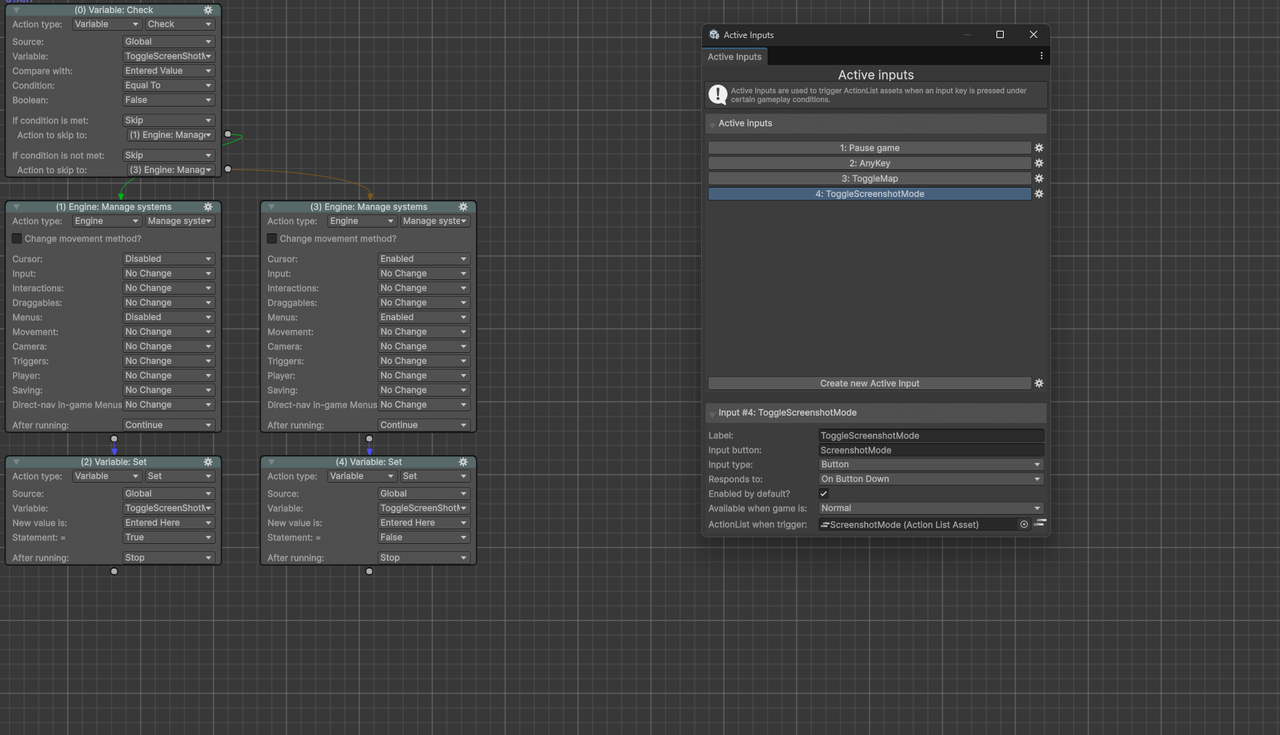
Thank you Chris, because the reason I ask is. I want to create like a screenshot mode. Where the cursor dissapear when you press a certain button on the keyboard. I have set it up in the Active Inputs. And I did assign a actionlist to the active input to switch off or on the cursor. But it does not work. Any suggestions?
Here is a screenshot of my setup.
What of the input's definition in the Controls asset?
Hey Chris please see below.
Are ToggleJournal / ToggleMap being detected correctly? I'm presuming these are Menu inputs.
I don't see any issue. Are you pressing the input during normal gameplay, and does the ActionList work correctly if you run it manually from the Inspector?