
How to keep dialog/speech on the screen until player input?

Hello,
I am trying to keep dialog line visible until player clicks on a dialog box(or anywhere) or a key press, but so far I am stuck in a loop of a dialog restarting itself(that's the best I could find)
What I want is:
1. Start a dialog/line of text said by the player
2. Display the text with all its built in animation etc.
3. Wait for player input
4. If player does nothing, the text should stay on the screen
5. If player clicks/presses a key etc. it should continue to the next line of dialog(if any available) or end the dialog.
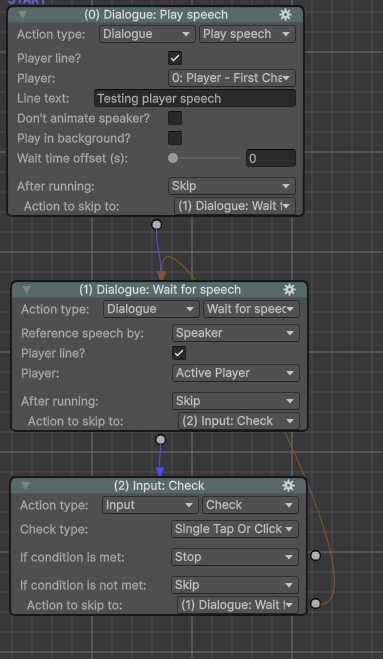
This is my latest attempt which doesn't really do anything, but that's all I found from another forum post here:
https://adventurecreator.org/forum/discussion/3827/simple-thing-how-to-make-dialogue-wait-for-lmb-or-screen-tap
Maybe I misuderstood it, but I need some help. Documentation page or a video/tutorial that goes through this or similar issue would be great.
Howdy, Stranger!
It looks like you're new here. If you want to get involved, click one of these buttons!
Comments
If this is for speech in general, you can set this behaviour at the top of the Speech Manager. Check Display subtitles forever until user skips it?, and then Can skip with mouse clicks? to have this work with default mouse input.
Thanks @ChrisIceBox that worked great.