
Scene: Add lags after first interaction

Hello! I've been having this issue, and was wondering if theres a way to avoid it:
Context: I've set up a minigame scene in my project, and was calling it through the main scene using Scene: Add Action. Once the minigame is completed, a button appears that calls a Scene: Remove Action, and removes the minigame scene. The first time this interaction runs, everything loads relatively smoothly, but the following interactions have some considerable lag.
I've recreated this behaviour with AC's demo and a simple "minigame" scene, that consists of a single button, and this lag still occurs.
The first interaction profiler:
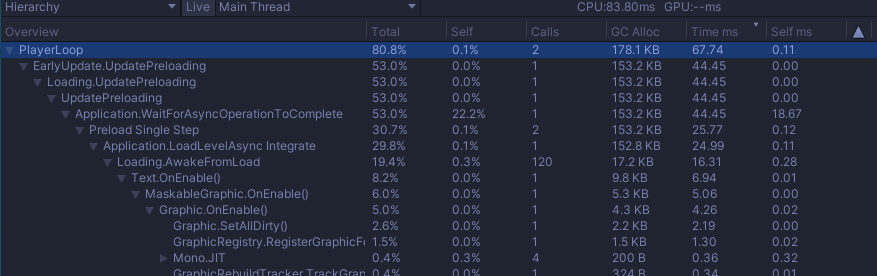
Then the second time the actionlist is run (more than half a second):
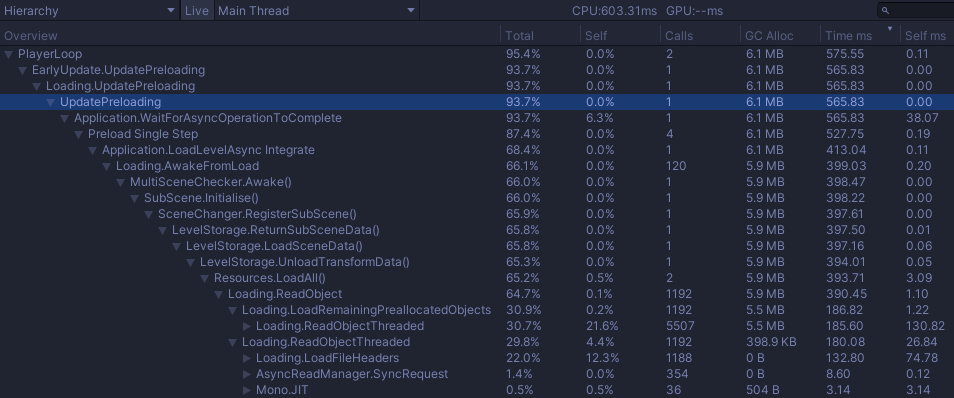
So I was wondering, is there a workaround or something to take into account so that the scene loads like for the first time?
Thanks!
Howdy, Stranger!
It looks like you're new here. If you want to get involved, click one of these buttons!
Comments
What is your AC version, and what are the contents of this second scene? Is it an "AC scene" in the sense of using the Scene Manager to configure it?
Subsequent loads of AC scenes typically involves loading any save data associated with that scene, recorded after it's closed. For example, any Remember component data you may have present in it.
You can delete this data with the following function:
Try calling this before opening your minigame scene. You can do so by placing the above function in a C# script, attaching it to a prefab, and using the Object: Send message Action to trigger the function on the prefab.
Yes, the second scene is an "AC scene" but has custom minigame scripts. The contents were basically a couple UI buttons, so that's why I though it was strange.
Needless to say, the solution works perfectly! Thank you so much Chris!