
AC.KickStarter.sceneChanger.LoadPreviousScene(); doesn't seem to do anything

Hi,
I'm working on a client's game and they use AC so i'm diving in. I must say I'm impressed with all it can do. Well done!
I'm trying to do a super simple integration with a custom puzzle. Click the thingy, launch the puzzle, when it is complete, return to the scene that launched it.
To simplify integration I made the puzzle it's own scene. So the process is:
1. Click hotspot, which is set to load Puzzle1 scene.
2. Puzzle1 scene launches, I can play my puzzle to completion.
3. Upon winning my code calls Invoke("Win", 5);
4. Win() only has one line which i found from Chris in another post:
AC.KickStarter.sceneChanger.LoadPreviousScene();
Is there anything else I need to do to get AC to switch back to the previous scene? Cuz it doesn't do anything. I'm just staring at my finished puzzle. I confirmed through breakpoints that LoadPreviousScene() is being called, it just doesn't do anything.
I'm using Unity 2017.4 if it matters.
Howdy, Stranger!
It looks like you're new here. If you want to get involved, click one of these buttons!
Comments
Welcome to the community, @LordYabo. Please let me know your AC version.
LoadPreviousScene only works if both the current and the previous scene are "AC" scenes - i.e. ones that have been set up with AC's Scene Manager.
How are you switching to the Puzzle1 scene? You'll need to use AC's scene-switching method - which can be done through script but also just use of the Scene: Switch Action.
If you need to disable AC in the new scene during the puzzle, you can either use the Engine: Manage systems Action to disable individual aspects (interactions, movement etc) separately, or turn off AC entirely through script: see the front page of the Scripting Guide for that.
1.66.1
I'm switching with a hotspot action:
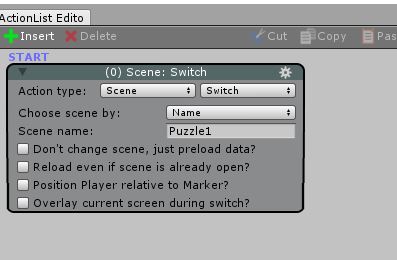
My puzzle1 scene is just a regular scene I made. Is there something I'm supposed to do to that scene to ACify it? Here is the heiarchy:
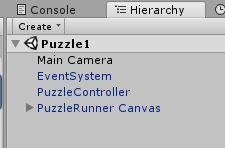
I did read that scripting guide page before I started. There isn't anything there that indicates i'm doing something wrong.
I have not turned off AC in my puzzle1 scene script.
An "AC" scene is one that contains a GameEngine prefab instance. This is added automatically when the Scene Manager is used to organise scene objects. See the Manual's "The Scene Manager" chapter for more.
AC will turn itself off if no GameEngine is present - the Console should inform you of this at the time.
I dragged in the GE prefab but that didn't make a difference.
I then opened up the SceneManager and clicked "Without folders" but it didn't seem to make any difference, the heiarchy never changed.
I then tried creating a Scene Attribute (property). Just to make sure this scene thing "took". I made one.
Then I ran it and the previous scene thing worked! Also my mouse cursor was now no longer blank, i had the AC dot again.
So thanks. I'm still not exactly sure what I did to make this puzzle1 scene an AC scene as I would have thought the prefab would do it.