
Forum rules - please read before posting.
Set Input box text does nothing?

So this is a bit strange, It seems to me that Menu-->Set Input box text doesn't do anything.
I have the custom menu as defined below:
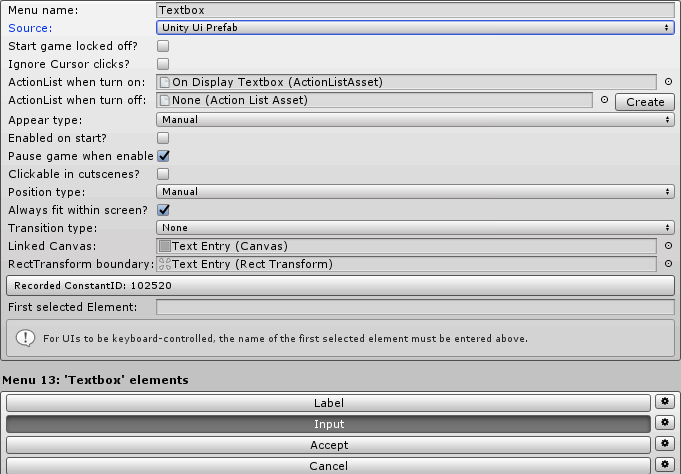
and on enable it calls this action list:
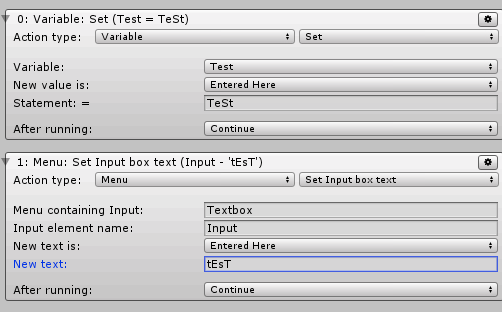
I know the action list is being called because that test variable I set at the top is being set. However the text in the input box is not being set. It just displays the last thing that was enetered into it last time it was displayed, or nothing at all if it was never displayed before.
I know that AC can see that input box and can get data from it because the following actionlist (called when the accept button is clicked) works just fine:
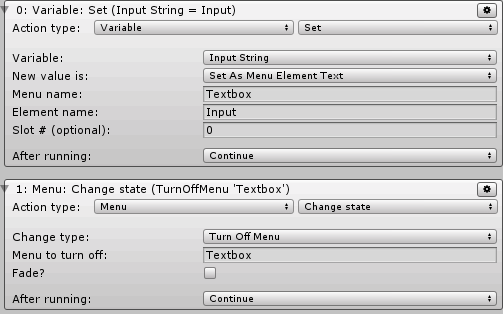
But the input box is never set. strange.
I have the custom menu as defined below:
and on enable it calls this action list:
I know the action list is being called because that test variable I set at the top is being set. However the text in the input box is not being set. It just displays the last thing that was enetered into it last time it was displayed, or nothing at all if it was never displayed before.
I know that AC can see that input box and can get data from it because the following actionlist (called when the accept button is clicked) works just fine:
But the input box is never set. strange.
Howdy, Stranger!
It looks like you're new here. If you want to get involved, click one of these buttons!
Quick Links
Categories
Welcome to the official forum for Adventure Creator.
Comments
if (setMenuInputBoxSource == SetMenuInputBoxSource.EnteredHere)
{
menuInput.label = newLabel;
}
else if (setMenuInputBoxSource == SetMenuInputBoxSource.FromGlobalVariable)
{
menuInput.label = GlobalVariables.GetStringValue (varID);
}
with:
if (setMenuInputBoxSource == SetMenuInputBoxSource.EnteredHere)
{
menuInput.label = newLabel;
if (menuInput.uiInput != null) menuInput.uiInput.text = newLabel;
}
else if (setMenuInputBoxSource == SetMenuInputBoxSource.FromGlobalVariable)
{
menuInput.label = GlobalVariables.GetStringValue (varID);
if (menuInput.uiInput != null) menuInput.label;
}