
Forum rules - please read before posting.
Custom PREFAB for Subtitles

Hello guys,
I have two problems that I can’t solve at the same time:
I use a Unity UI prefab for subtitles, positioned above the speaking character and always fitting within the screen.
I have CanvasBen with a child CanvasBen2.
CanvasBen2 has a width of 1000.
What I would like 🙂:
- When my hero is at the edge of the screen, the text shouldn’t appear far from him → this WORKS when I set Horizontal Fit = Preferred Size.
- When the text is too long, it shouldn’t go outside the screen → this WORKS when I set Horizontal Fit = Unconstrained.
But I can’t solve both problems simultaneously…
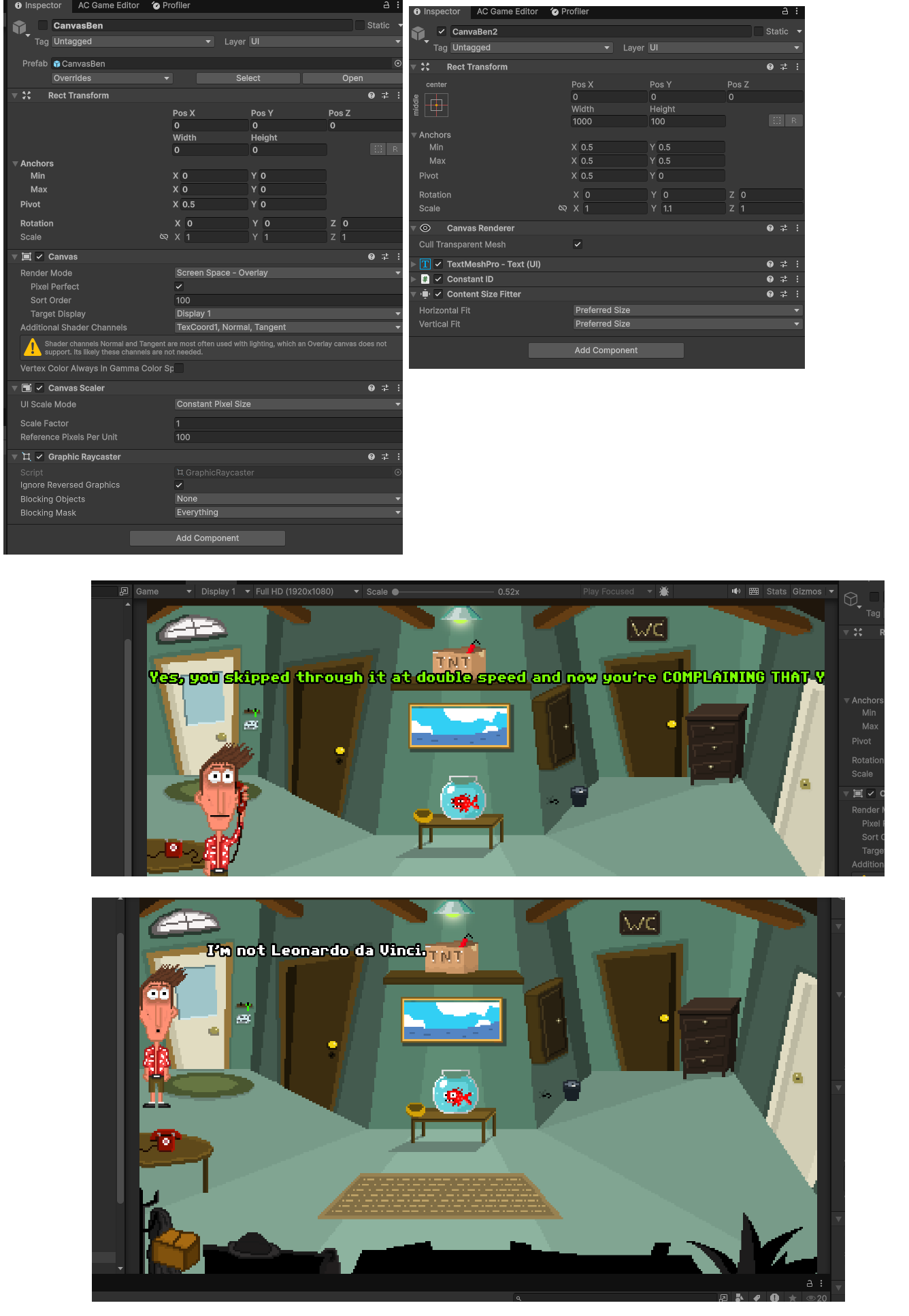
How can I solve these two problems 🙂?
Thanks!
Howdy, Stranger!
It looks like you're new here. If you want to get involved, click one of these buttons!
Quick Links
Categories
Welcome to the official forum for Adventure Creator.
Comments
This isn't so much an AC topic as it is a Unity UI one, but if you attach the Layout Element component to the chid, you can check Min Width and give it a small value for shorter lines, e.g. 300.
With the Content Size Fitter's Horizontal Fit set to Preferred Size, this should cause shorter lines to make the child the minimum width, while expanding for longer lines.
Hey Chris, thanks for the answer. My issue is that when I set Preferred Size (even with a Min Width in the Layout Element), longer sentences go outside the screen (see the picture with the yellow font above), even if “Always fit within screen” is ticked in AC.
The Always fit within screen? option works by adjusting the Menu's RectTransform boundary - which is typically the first immediate child of the Canvas, and the shared parent of any visual elements that make up the Menu.
If your Text box is the Canvas' only child, it may be that there's a conflict caused by AC and the Text contents competing to control the same properties. The Text box ideally should be a child of the RectTransform boundary.
See the default HotspotUI prefab for an example of how to set up a dynamically-resizing Canvas prefab for the Menu system.
Hey Chris,
Sorry, but despite my efforts, I can’t solve the problem.
As I saw in both the Hotspot UI prefab and the Subtitle prefab, I added a RectTransformBoundary.
Trying multiple things like adding horiznotal layout group etc but the text still goes off-screen on one side.
I do not recognise what's being displayed in the Canvas root object - is this being parented to another object? Why is the GameObject disabled?
If you PM me the Menu Manager and CanvasBen prefab, I will take a look.
The issue occurs when the text is so long that it spans the full width of the screen. It's a case of Unity's provided Content Size Fitter not being able to set a maximum width.
To get around this, use the ContentSizeFitterEx script provided here on the Unity forum:
https://discussions.unity.com/t/setting-maximum-width-of-layout-element-with-content-size-fitter/586475/18
Attach this to the RectTransform boundary, set minimum and maximum size values, checking Preferred Size for both width and height, along with a Horizontal Layout Group that controls child size, but not child force expand.
It worked ! Thanks a lot Chris