
Pick object: rotation questions

Hi Chris and everyone!
I am using Pick Object for the firt times, I never needed it before for my games. It works great to move my objects and I could activate the rotations easily. It's an exciting feature. I have a coupe of issues however, and I have not found an answer in the tutorial or on the forums.
Context: I am trying to create a tray puzzle (similar to Stewart Coffin's Tray puzzles) where the player can take a piece and manually rotate it clockwise/ccw on the Y axis, which is a very common type of puzzle I think.
I have invented several similar ones of my own that I 3d-printed, and would like to include a few ones as part of the puzzles in my current game project.
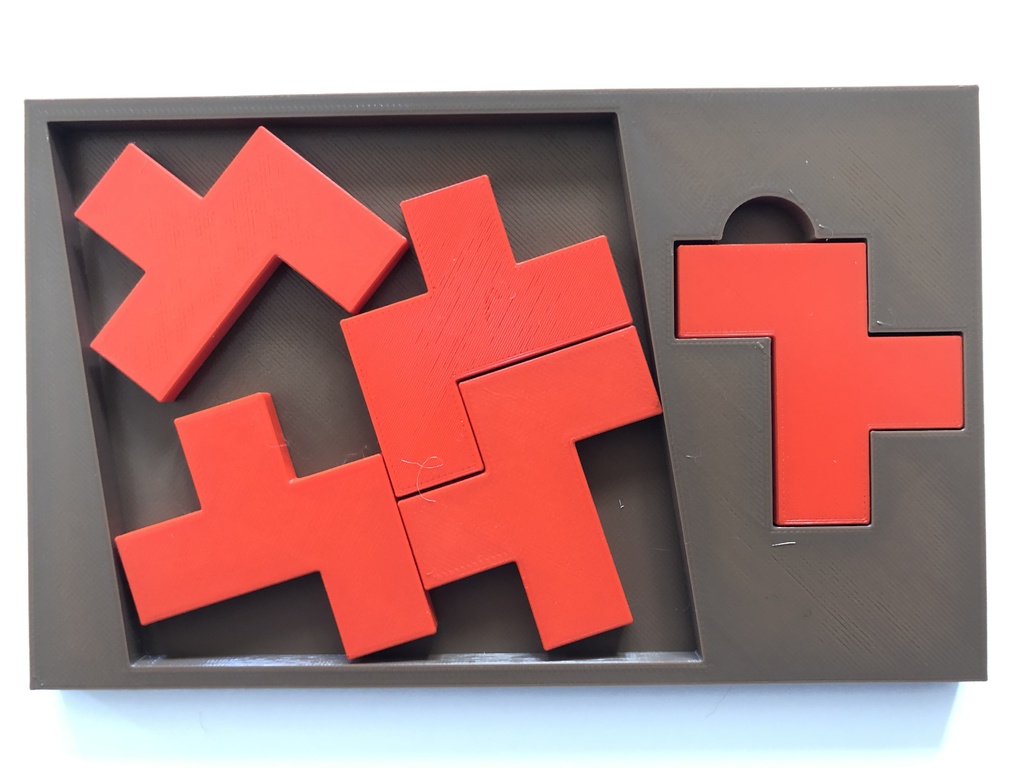
My questions:
The rotations only seem to occur on the X/Z axis from what I see, which is convenient when you want to examine an object, but not when you want to turn it left or right in order to place it properly at a specific empty place. I tried to change the contraints in the rigidbody but it didn't help. I can prevent the rotation on X/Z, but not allow it on Y. Do you think there is an easy way to do this, or is it not possible basically in AC?
Do you think there would be an easy want to allow the player to change the direction of rotation from clockwide to counterclockwise? It seems to always rotate cw with the current options. I wouldn't mind adding a button/menu to allow the player to change, but I have not found the way to do it. Is it a possibility or does it require to tinker a bit?
Any idea/suggestion that could help me to make that kind of puzzle with AC in the best possible way is welcome.
Thanks in advance for your help!
Howdy, Stranger!
It looks like you're new here. If you want to get involved, click one of these buttons!
Comments
What are your AC/Unity versions, and can you share screenshots of your setup and/or a video showing the rotation effects you're getting? The PickUp component should allow for rotation along all axes.
This component is more designed for object-examination, however, as you say. AC does have an "Item arranging" template on the Downloads page, but it's in 2D and doesn't involve rotations. There are a lot of nuances to the kind of puzzle you're describing, depending on how refined it needs to be, so it might be that it's best handled by a dedicated asset that sits in a separate scene that AC switches to.
Unity 6.2 and AC 1.84.3
https://imgbox.com/iLy2LfSJ
I added an input to rotate the piece when button held:
https://imgbox.com/4lVgSIK9
I followed this tutorial:
https://adventurecreator.org/tutorials/creating-object-can-be-picked
I set up the piece like in the tutorial:
https://imgbox.com/Rlkhblpl
When playing preview, I can move the piece:
https://imgbox.com/C4k8WmLG
If I don't change the PickUp settings, the default X Z rotation works:
https://imgbox.com/1Xyxu5PD
But I would like to allow the player to rotate on Y only, like this:
https://imgbox.com/IQno6PFf
If I want rotation constraints to be effective, I have to uncheck Autoset RB contraints in the Movement settings.
(then I can constraint X and Z, I verified that it works)
Finally I only leave Y rotation without constraint:
https://imgbox.com/RMIbDfCu
Unfortunately when I hold the rotation button andmove the mouse cursor, the piece won't rotate.
Thanks for the details, I'll attempt a recreation.
I've looked into this - thanks for bearing with me.
What's occuring here is technically correct. The rotation input being fed to the PickUp is always the same - the effect of the constraints happens afterwards.
Looking down from above, dragging sideways, will cause a rotation around the Z-axis. As this is locked, it results in no rotation.
To override which direction the rotation occurs in, you can rely on a custom script that reads the intended drag force and rotates it around the Z-axis specifically.
To do this, you'd need to rename your "RotateMoveable" input to something else (so that AC no longer reads it), and have this new input be referenced by a custom script attached to the object.
Something along these lines:
Thanks a lot Chris, I really appreciate that you took some time to help me with this! I'll try your script as soon as possible and will let you know how it worked in my project.
Hi! Unfortunately your script didn't seem to resolve my issue. I don't know what's wrong but there has to be a setting in my scene that blocks the only rotation that I want (Y axis).
I have recreated the same puzzle, alone in a new empty project, and put the PickUp script on the piece: I could rotate it on Y! It drives me crazy lol
So there has to be something in my scene, but I can't figure out what. I'll dig further tomorrow and will let you know if I have more questions.
Thanks again!
In case someone else would struggle with the same problem: I have finally found out the cause of it.
Rotating a PickUp object on Y only won't work if the camera is strictly aligned with this axis.
- My camera rotation was X90, Y180, Z0. With these values it is strictly looking top down and is aligned with the Y axis.
- Changing to X85, Y180, Z0 solved it, and I can now rotate my object freely cw or ccw as I want.
Problem solved.