
A third of the way through the 2D tutorial the collision/movement goes haywire
Hello everybody,
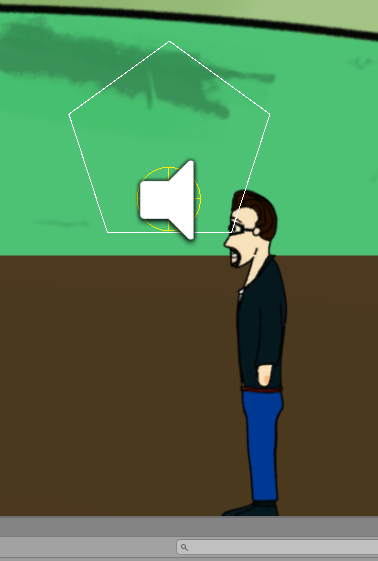
I have recently purchased AC and it looks great AFAICT but it seems the 2D tutorial and me got off on the wrong start. Essentially what happened is that the "Brain" character didn't really want to go around the tree as envisioned. I went back and forth with various small changes to see where we got off (without the hole, without the SortingMap) and so on. Finally, I re-started the entire tutorial and just wanted to use the simplest Polygon for the mesh, yet the character still the weirdest things like walking OUTSIDE the entire scene off camera. When I used a plain pentagon mesh, it also happened and I'm losing what little hair I have left. I've attached a small example image. The figure is clearly not in the mesh and I can't get them to, no matter what I do with PlayerStart.
Help would be much appreciated!
IWannaBeAnAdventureGameCreator [but that was too long a username!
Howdy, Stranger!
It looks like you're new here. If you want to get involved, click one of these buttons!
Comments
Welcome to the community, @NotAPirate.
Technically speaking - the character is in the right place. The character's "true" position is determined by their root position - which is where the yellow circle and speaker icon are showing.
The issue is that the character's sprite - which must be a child of the root - has a non-zero local position, meaning it's in a different spot to its root.
If you check Unity's Console window, you should find you're getting a warning from AC about this: something of the form:
To fix it, you just need to clear the sprite child's local position, which is a case of selecting the child sprite object and setting its Position to 0,0,0 in its Transform component. Since the character's sprites pivot around his feet, that'll cause him to appear in the correct position in the scene.
Thank you @ChrisIceBox, that worked!