
Forum rules - please read before posting.
'Mark options already used' not working for AC Conversation Menu?

Hi, wonder if someone / Chris could please advise - using AC 1.85.1 and Unity 6.
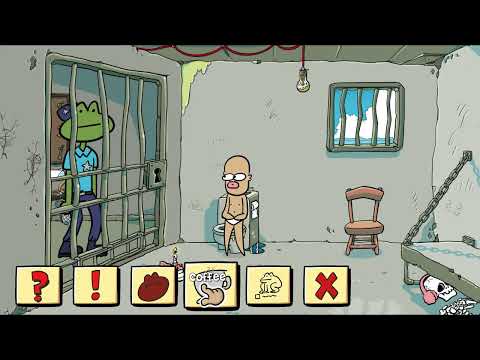
I've reverted back to using an AC Menu for the conversation icons. I'd like to have the ability to tint the colour of the the conversation icon options for icons already clicked, but it doesn't seem to work. Is there any way to get this work please? I think I had it working using UnityUI menu, but overall prefer the simplicity of AC's menus.


Here's what I had working with UnityUI, showing the tint working:
Howdy, Stranger!
It looks like you're new here. If you want to get involved, click one of these buttons!
Quick Links
Categories
Welcome to the official forum for Adventure Creator.
Comments
Within AC menus, this option will only affect the Text colour. I ought to hide this option if if "Display type" is set to "Icon Only" - apologies for it being misleading.
Hi Chris, hope all well. I have another question on 'Mark Options Already Used' and 'Already Chosen Color'. It's working well for icons, but in some cases I'd like to manually reset the colour tint on certain dialogue options after they've been chosen. Is there a way to do this, like in an action in an ActionList perhaps?
Or alternatively, if I uncheck 'Mark Options Already Used', is there a way to manually apply the colour tiny ON to various dialogue icons that have already been chosen?
Thanks.
Try this:
https://adventure-creator.fandom.com/wiki/Manually_set_Conversation_"chosen"_state
Thanks, that look like it did the trick. Was struggling to figure out why the new Action wasn't showing up in the 'Custom' category of Actions but I see it's been placed in the 'Dialogue' category - nice, thank you.