
Adding rotation to world space UI

Hi Chris
Can I ask for a feature addition, if it's not already there somewhere.
Can you add support for rotation when using the Centre-Point override parameter of a hotspot with a UI prefab that is set to Worldspace?
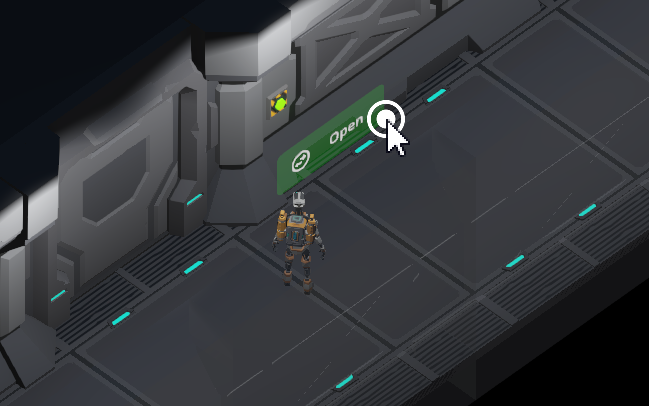
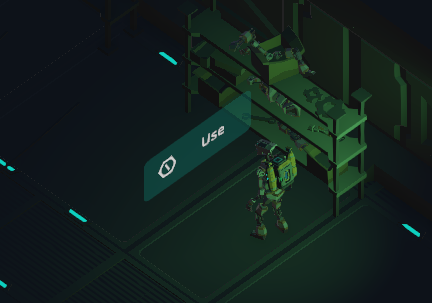
Currently I want my UI to appear in the world space, in front of a hotspot. It works, but my game using isometric viewpoints, and the world space UI always faces the same way. An easier option would be to optionally support matching the rotation of the centre point override transform when using a world space UI object. That would rotate the UI to match whatever the centrepoint transform is set to.
I know I could create a script and put it on every hotspot and set it to change the rotation, but thought I'd ask for a change here for the greater good.
You can see the issue here. Both interaction menus face the same way relative to the camera but I'd like them to match the facing direction of the hotspot objects they relate to.
Howdy, Stranger!
It looks like you're new here. If you want to get involved, click one of these buttons!
Comments
Thanks for the explanation - though I'm on the fence about an official change. There'll likely be instances where such a rotation isn't wanted, and AC as a rule only controls Menu positions so that their rotations can be manually controlled.
A custom script on each Hotspot wouldn't be necessary, however. One on your Canvas prefab's root can extract the data from the Hotspot it's attached to:
Thanks Chris. I wasn't thinking of an enforced change, but perhaps rather just a tick box showing in the Hotspot settings when the user chooses "Show icons in world space", and tick box just says something like "Match CentreOverride rotation" perhaps. Can default to off to keep forward compatibility.