
Forum rules - please read before posting.
Black Bars gap at bottom of screen
Howdy, Stranger!
It looks like you're new here. If you want to get involved, click one of these buttons!
Quick Links
Categories
Welcome to the official forum for Adventure Creator.
Comments
Also wanted to mention - the 'Scale With Screen Size' setting did fix my issue, thank you muchly. However, I'm using ActionLists to animate the bars in and out, and I would like to try and understand how to do things the intended way with the 4 animation states. (I also have fiddled so much that I struggle to remember the steps I took to get the bars working in my main project, so am struggling a bit to recreate a menu to fiddle with in a test project to try and understand things better. The last test I did, the bars move when the camera moves, not sure how I avoided this initially)
The default canvas will appear much larger in the scene than the rest of your objects - but this won't affect the way it appears in the Game window.
Yes, you'll need an Animator attached to the root object - if these have the 4 animation states, they'll be played automatically with no need to manually animate via ActionLists.
Can you share screenshots of how things now look?
Hi Chris, I thought it had it working in Unity but when I make a Web Build, I'm sadly getting the same funky result.
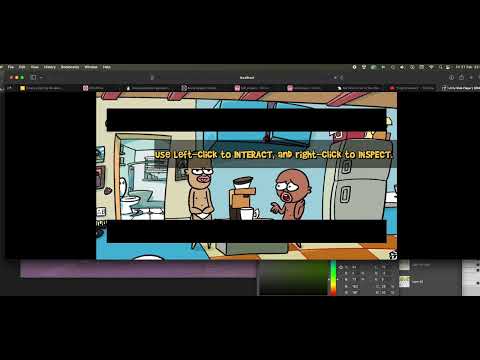
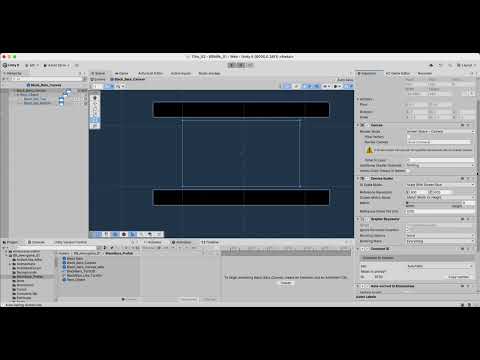
Hmm... I'd love any help you could please provide here.
Here is a video of what happens when I expand the web browser when playing the game:
Here is a video of all the settings I can think of that might be useful to show about the PreFab:
Would love to sort this out properly, is proving to be a tough nut to crack, but I'm pretty confident there must be a solution to getting black bars / a Unity UI to display correctly. I'm assuming at this point I must be doing something wrong.
Thank you.
I shall provide a "Cutscene Borders" template in the next AC update.
Hi Chris, thank you, that would be fantastic. Will back up and update when ready, and/or start a new project and add the template to try and learn from and reconstruct it (have found deconstructing the demo projects very useful). As always, so very grateful for this incredible engine you’ve created, thank you, has made making my dream game a possibility and am excited to finish and share the final game.
Hi Chris, hope all well. A question please - I've released my demo on Steam. Seems to work on PC, Mac and Linux. A user tested it on Fedora Linux, he has a 38' wide screen, and reported that the black cutscene bars aren't showing correctly. Granted, these are the same cutscene bars I incorrectly made, and not the template one you included with an AC update.
What I'd like to know please is, would I be able to import / incorporate your Cutscene Borders into my AC v1.83 project? And do you think they should show correctly for widescreens too? I was hoping things would be locked to a 16:9 limit, but he mentioned even the one menu I had was looking funny, I guess because it's showing the question on one line on the widescreen monitor, instead of usually on two lines on a 16:9 monitor.
I suppose one way I could do things is create a new blank project, import the latest AC version, and try my best to recreate what you've done with the Cutscene Borders in my current project. Unless there may be an easier way I can get it into my project?
Thank you.
[EDIT: the player suggested this: "Yeah I'm using 21:9. It's not the "standard" but more popular than you'd think. I think if you just extend the black bars up and down, like double the length, you're gonna be fine on widescreens, cause I could see them appear and slide down"
So, that's one option that may work, just making the black bars much bigger so they'd hopefully cover the gaps of most screen aspect ratios, including 21:9]
You can import any Template from the New Game Wizard in an existing project - just choose "Modify existing" on the first page.
The Game window can simulate different resolutions to test in. The border template should be dynamic enough to support 21:9, but the player's suggestion is right - you could also just extent the bars beyond what's visible on most monitors.
Thanks - making the borders bigger and tweaking their settings did the trick. The black bars still come more 'in' (fill the screen more at the top and bottom) in 21:9 than they do on 16:9, but I found a decent compromise I think.
Was v helpful being able to simulate the 21:9 resolution in the Game window during testing, thanks.